
Have you ever hosted a digital party? Yes, you heard it right, a digital party!
As COVID-19 struck, the concept of virtual handouts appeared. Handouts were not limited to just group video calls. They extended to watching movies together.
Platforms like Metastream introduced us to digital party streaming. From music videos to blockbuster series and movies, you can enjoy any kind of media with this shared media streaming platform.
So, let’s get started to find out how you can host a session on this platform, its unique features, and genuine reviews from other users. Keep on reading!
Metastream Media Streaming
Metastream is a browser extension (for Chrome and Firefox) that allows you to co-watch media from YouTube, Netflix, SoundCloud, Hulu, and Twitch. Means only one can host a streaming session while many people can stream the same media on their different screens.
While built-in platform features like “Amazon Prime Video Watch Party” and “Disney+ GroupWatch” charge extra money, Metastream offers the same features without charging a penny.
Whether you are in a long-distance relationship but want to enjoy a romantic movie together, or you want to party with friends/family virtually, this platform instantly feels like you are connected, regardless of the physical distance.
Here are some more detailed overview of the platform:
- Genre: Co-watching Video Streaming Site
- Subscription: Free
- Stream Limit: Unlimited
- Age Restriction: No direct age restrictions (but the streaming content may impose)
- Latest Update: November 11, 2020
Streaming Features of Metastream
Metastream has revolutionized the way we used to stream our favourite movies or media. No more enjoying your favorite movie, series, or music video alone. Since co-watching is a thing now, I have also tested all the Metastream video streaming features, and here’s what I found:
Customizable Sessions
Meta stream allows hands-on customization to your session as well as your profile. Even though each session supports unlimited users, you still have access to a maximum number of users. You can pick your own avatar, unique display name, chat color, and session mode (Public, Private, Offline).
That’s not it. You can select whether you want auto zoomfill the streaming, on theater mode to hide all the non-video content, and on timestamp next to the chat box. So, yes, the customization is insanely outstanding.
Synchronized Content Sharing
It allows you to choose from an array of media platforms, where you can search for your favourite movies, music videos, or any form of content available. Once you start playing, the playtime syncs with all the shared screens. You can pause, skip, and auto-play as per your preferences.
Real Time Chat
Metastream offers real-time chatting with the streaming partners. This feature truly enhances the shared watching experience, making the streaming time more interactive. You can share your excitement and feelings ten times better.
Community Building
The platform offers a community forum where like-minded people can join. By making your streaming session public, you can share the URL with your community friends to enjoy the media content together. The core purpose of this feature is to expand your co-watching experience globally and make new interactions.
If these exciting features have convinced you to try out Metastream, then follow the steps below to get started with this platform. And why not just try once? It’s FREE!
How to Get Started with Metastream?
Step 1: Visit Web Extension
Go to the Metastream. Then, on the home page, click on the “Open Metastream” button.
Step 2: Set Profile
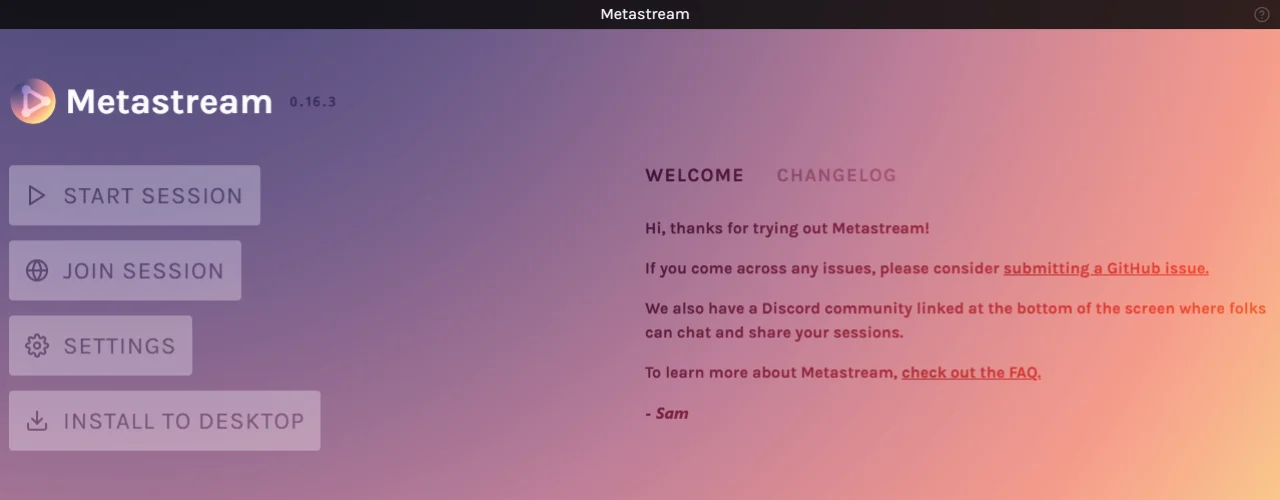
On this page, you will find four options. Click on the settings to customize your unique display name and avatar. This will help you stand out during the chat session.
Step 3: Start Session
Click on the “Start Session” to host a streaming. Then choose a browser extension (Chrome/Firefox) for playback. On the right side of the “NEXT UP” bar, there is a “+”. Click on it to choose your media platform. Go to any, log in to your account, and host streaming.
Step 4: Join a Session
If your friends or family have already hosted a session, then copy the URL they have shared, click on the “Join Session”, and paste it in the search bar.
If you don’t have a session to join, don’t worry! To find a new session, click on the Discord logo to join the community. Create your account and be a part of the community. The members here host co-watching sessions that you can easily participate in by sending a request.
What Metastream Does Not Offer
Till now, you have found what Metastream offers and how you can get started to enjoy its amazing features. But you must also understand what this platform does not provide. Here they are:
✘ This platform is not supported on mobile platforms (Android/iOS).
✘ It has not developed an app. The GitHub Q/A shared that the current resources can not afford that.
✘ The streaming extension does not support personal files from your drive.
✘ You can’t share the screen during a running session.
✘ There are no audio or video chat features available.
✘ Lucky/Unlucky, Metastream has no premium features and is completely free.
Is This Media Streaming Platform Worth It?
The worth of Metastream as a co-watching streaming platform is a matter of perspective. The shared streaming with no registration required, access to major media platforms, and a real-time chat option make the sessions truly enjoyable.
However, the streaming might not be so seamless at times. The Netflix playback opens on a new tab, which makes chatting a hassle. You may need to switch between tabs. There was a time when one of our streaming members faced a slight delay from the original streaming.
Another thing to note is that you can’t directly invite friends or family through Metastream. You need to copy the URL to either text them or email them.
Nevertheless, the platform has already made a statement on the site, warning users to expect some issues as the platform is still in beta and troubleshooting is ongoing. So, until all errors/bugs are solved, we can compromise on the features and functionalities.
What Major Review Platforms Are Saying?
There are very few in-depth reviews on Metastream. Here are some general ratings from real users on broad review platforms:
- On addons.mozilla, Firefox users have rated this platform a 4.4/5.
- On Common Sense Media Review, the platform has rated it a 3/5.
- On Trustpilot reviews, the platform has a 3.7/5 rating.
Metastream vs Others
| Specification | Metastream | Teleparty | TwoSeven | Rave |
| Free/Paid | Free | Freemium model | Freemium model | Freemium model |
| Streaming platforms | Netflix, YouTube, Hulu, Reddit, Twitch, SoundCloud, Crunchyroll | Netflix, Disney+, Hulu, Max, Prime Video, and YouTube | Netflix, Amazon Prime, YouTube, Hulu, Disney+, and personal files | Netflix, Disney+, YouTube, and Amazon Prime |
| Real-time text chat | ✅ | ✅ | ✅ | ✅ |
| Audio & Video | ❌ | ✅ | ✅ | ✅ |
| Mobile-first | ❌ | ✅ | ❌ | ✅ |
Start Your Free Streaming Today!
Ready to create a virtual party room for your homies? Metastream has secured its own place as a thriving co-watching platform for its extensive free features. As we have already mentioned above, you can easily host a playback or even attend global sessions with like-minded people through the community forum.
You only require a stable network connection and a workable PC. And the occasional hiccups, we can adjust until they fix them. We can understand that maintaining a free platform with guaranteed perfection can be tough for a small resource.
FAQs
Is Metastream secure?
Yes. This platform is safe and secure to use as it works within your browser extensions (Chrome and Firefox) and syncs the existing streaming. Also, another factor that guarantees your data safety is that it does not allow opening your personal files, which means the platform has no access to your drive or device.
Can I access Metastream from any region?
Yes. This platform is accessible from most of the regions, unless you live in Russia. Reports say that they have blocked access due to censorship. However, a secure VPN service may still work.
Can I stream the NFL on Metastream?
While some other sources suggest that Metastream supports NFL game streaming, there is no such additional platform available on the site. You may use YouTube to watch live streaming.